Cart

← Back to the guide

Signatures-Modul · Benutzeranleitung

Einheitliche E-Mail-Signaturen für das ganze Team

Das Signatures-Modul gibt allen E-Mails aus FreeScout dieselbe Signatur — einmal von der Verwaltung entworfen, für jede Person automatisch mit deren eigenen Angaben gefüllt. Niemand baut sich mehr seine eigene zusammen, und niemand vergisst die Telefonnummer.

Es arbeitet allein und braucht kein anderes Modul.
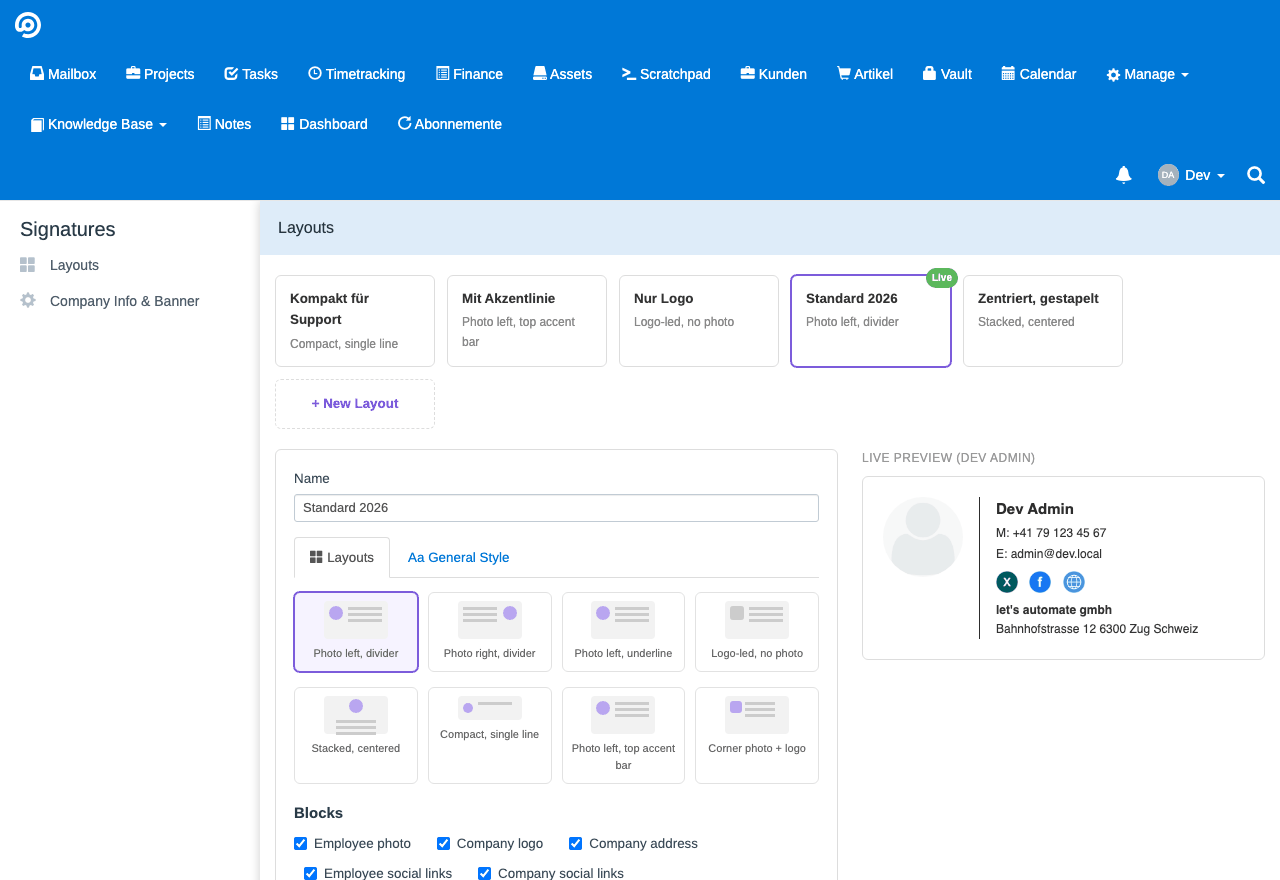
Die Auswahl der Anordnungen in der Verwaltung
Acht Anordnungen
fertige Aufbauten zur Wahl
Eine gilt
genau eine Vorlage ist aktiv
Je Person
eigene Nummer, eigene Profile
Ein Banner
zentrale Werbefläche, zuschaltbar

Die Aufteilung

Zwei Orte, und die Trennung ist der Kern der Sache:

Verwalten → Signaturen
Die Verwaltung entwirft das Aussehen: Aufbau, welche Blöcke erscheinen, Farben und Schrift. Gilt für alle.
Ihr Profil → Signatur
Jede Person trägt nur ihre eigenen Angaben nach — die, die die Vorlage nicht schon aus dem FreeScout-Profil holt.

So bleibt das Aussehen einheitlich, ohne dass jemand Namen und Nummern zentral pflegen muss.

Eine Vorlage entwerfen

Du kannst mehrere Vorlagen anlegen, aber genau eine ist aktiv — das ist die Signatur des Unternehmens. Die anderen sind Entwürfe, mit denen Du etwas ausprobieren kannst, ohne den laufenden Betrieb anzufassen.

Zu entscheiden ist:

  • die Anordnung — acht Aufbauten stehen zur Wahl: Bild links mit Trennlinie, Bild rechts, Bild links mit Unterstreichung, Logo statt Bild, gestapelt und zentriert, einzeilig kompakt, Bild links mit Akzentbalken, Bild in der Ecke mit Logo
  • welche Blöcke erscheinen: Firmenadresse, Firmenlogo, Mitarbeiterbild, Firmenprofile, persönliche Profile
  • der Stil: Akzentfarbe, Textfarbe, Schrift, Schriftgrösse und ob Links unterstrichen sind

Die Vorschau zeichnet sich bei jeder Änderung neu — Farbe, Anordnung, Schrift. Du musst nicht erst speichern, um zu sehen, was daraus wird.

Was jede Person selbst einträgt

Unter Ihr Profil → Signatur trägt jede Person nur das nach, was die Vorlage nicht schon kennt: eine Mobil- oder Direktnummer und ihre persönlichen Profile. Dazu wahlweise ein eigenes Bild; ohne eines wird das Profilbild aus FreeScout genommen.

Name, E-Mail, Telefon und Funktion kommen aus dem FreeScout-Profil und werden hier bewusst nicht ein zweites Mal geführt. Zwei Orte für dieselbe Telefonnummer heisst, dass eine davon irgendwann die alte ist.

Eine Administratorin kann diese Angaben auch für andere ausfüllen — praktisch bei jemandem, der neu dazukommt.

Wo die Signatur erscheint

An zwei Stellen, und die zweite ist die, an die man nicht denkt:

In FreeScout
Die Signatur wird automatisch in den Antwort-Editor eingesetzt. Es ist keine Änderung an FreeScout selbst nötig.
Für andere Programme
Auf der eigenen Signaturseite gibt es In die Zwischenablage kopieren und Als .html herunterladen — für Outlook, Apple Mail oder Gmail.

Der zweite Weg ist der Grund, warum das Modul auch dann nützlich ist, wenn Dein Team nicht alles über FreeScout schreibt.

Das Werbebanner

Ein einzelnes Bild mit Link, zentral hinterlegt unter Verwalten → Signaturen → Firmendaten & Banner. Ist es eingeschaltet, hängt es unter jeder Signatur.

Der Schalter ist unabhängig davon, welche Vorlage aktiv ist. Eine Kampagne lässt sich also ein- und ausschalten, ohne das Signatur-Layout anzufassen — und umgekehrt.

Der LinkedIn-Hinweis

Ein einzelner Schalter am selben Ort setzt einen «Folgen Sie uns auf LinkedIn»-Hinweis in jede Signatur. Er verweist immer auf die Unternehmensseite aus den Firmenprofilen, nie auf das persönliche Profil einer Mitarbeiterin.

Ist keine Firmen-LinkedIn-Adresse hinterlegt, wird der Hinweis automatisch weggelassen — auch wenn der Schalter an ist. Ein Hinweis, der ins Leere zeigt, wäre schlimmer als keiner.

Symbole austauschen

Für alle acht unterstützten Netzwerke — LinkedIn, Xing, Twitter/X, Facebook, Instagram, YouTube, TikTok und Website — liegen flache Symbole bei. Sie sind selbst gezeichnet und aus keinem Marken-Baukasten übernommen, also ohne Rechtefragen benutzbar.

Jedes einzelne lässt sich unter Verwalten → Signaturen → Firmendaten & Banner → Social Media Icons durch ein eigenes Bild ersetzen. Dafür ist keine Änderung am Modul nötig, das Hochladen genügt.

Gut zu wissen

Frisch installiert ändert es nichts

Solange keine Vorlage aktiv ist, verhält sich FreeScout genau wie vorher: es benutzt weiter die einfache Textsignatur des Postfachs. Du kannst das Modul also einschalten und Dir in Ruhe eine Vorlage bauen, ohne dass in der Zwischenzeit jemand eine halbfertige Signatur verschickt.

Fehlende Angaben lassen keine Lücke

Ist kein Firmenlogo, keine Adresse oder kein Profil hinterlegt, wird der jeweilige Block einfach weggelassen — nicht als leerer Kasten gezeigt. Jeder Block lässt sich zusätzlich je Vorlage ausschalten.

E-Mail-HTML hat echte Grenzen

Die Signaturen sind mit Tabellen und Inline-Stilen gebaut, und die Symbole sind echte Bilddateien statt SVG. Das sieht altmodisch aus, ist aber der Grund, warum die Signatur auch in Outlook so aussieht wie in der Vorschau. Wer eine neunte Anordnung ergänzen möchte, muss sich an dieselben Regeln halten.

Signatures für FreeScout · letsautomate.ch · immer aktuell unter shop.letsautomate.ch/shop/anleitung/signatures

← Back to the guide

Good to know

Frequent questions

Everything you should know about our modules, licences, updates and support before you buy.

Why does my purchased FreeScout module show an expiry date?

With your purchase you get the module plus twelve months of support, security updates and new features. The expiry date shown refers to those included services — not to your right to use the module at all.

What happens when my licence expires?

The module you have installed keeps working. Once the licence has expired, though, no new security or feature updates arrive and the included support can no longer be used.

You decide for yourself whether to renew the licence or to keep using the installed module without further updates, at your own responsibility.

Others promise lifetime updates. Why don’t you?

Technologies, security requirements and dependencies keep changing. What works reliably today can be outdated or unsupported tomorrow. Good software therefore needs continuous care, testing and development.

Rather than tie you to a permanent subscription, we leave you the choice: renew your licence, or keep using the installed module without further updates, at your own responsibility.

Do I need your LaStore module?

No, but the LaStore module connects your FreeScout instance with the modules you bought, and it brings several advantages:

  • installation with one click
  • automatic detection of available updates
  • easy updating right inside FreeScout
  • verification of the package signature
  • protection against module packages altered or tampered with unnoticed

Our modules do not use the normal update process, because it is not secure. The LaStore module verifies each of our modules before updating. An attacker therefore cannot deliver forged, dangerous updates. Without this module the verification is up to you, and it is a manual process.

without LaStorewith LaStore, autopilot offwith LaStore, autopilot on
learns about new versionsnoyes, dailyyes, daily
installsby hand from the portalat the press of a buttonovernight, without you
verifiedby you, via shasum -a 256yesyes
Do I really get the complete source code?

Yes. Our modules are provided under the AGPL-3.0 licence. The module as delivered contains the complete source code, which you can inspect and adapt within the terms of that licence.

On how many FreeScout instances may I use the module?

One licence covers one active FreeScout instance. Two free server moves are included on top of that.

If an old server is no longer in use, the system releases its activation automatically after 90 days. An instance that is unreachable or already deleted is therefore not counted against your licence for good.

Can I return a module I bought?

You have a 14-day right of return. It ends as soon as you activate the module — not already when the licence key is delivered to you.

So activate the module only once you have finally decided to use it. For consumers in the EEA, the statutory provisions on the right of withdrawal for digital content apply in addition.

Who issues my invoice?

Payment is handled by Paddle. Paddle acts as Merchant of Record and therefore as the seller. That is why Paddle appears as the issuer of the invoice, and possibly also as the payee on your card or bank statement.

Does a module need other FreeScout modules?

That depends on the product. Some modules work entirely on their own and offer additional features when other modules are present. Others have hard dependencies.

The slot finder, for example, strictly needs the Calendar module, because the available appointments are worked out from the calendars kept there.

Required and optional dependencies are stated on each product page.

What can I do if something doesn’t work?

We test our modules carefully. Even so, a feature may not behave as expected in a particular environment.

Every module comes with a detailed guide. If that does not get you any further, you can open a support ticket. Describe the problem briefly and the steps you have already taken — we are glad to help.

Pay securely, worldwideYour payment is handled securely by Paddle. You can pay from anywhere in the world, comfortably in your own currency — proper invoicing included.
Open, auditable, adaptableThanks to AGPL-3.0 you get the complete source code. You can audit the software, adapt it yourself and keep running it independently.
Two server moves includedYour FreeScout instance is moving? You can transfer your licence to a new server up to twice, free of charge, and keep using the module there.
Install once, stay current by itselfWith our LaStore module for FreeScout you install what you bought with a single click. Available updates are checked and installed automatically.

Play video

Playing establishes a connection to YouTube.

View image