Booking module · User guide
Customers book their own appointments
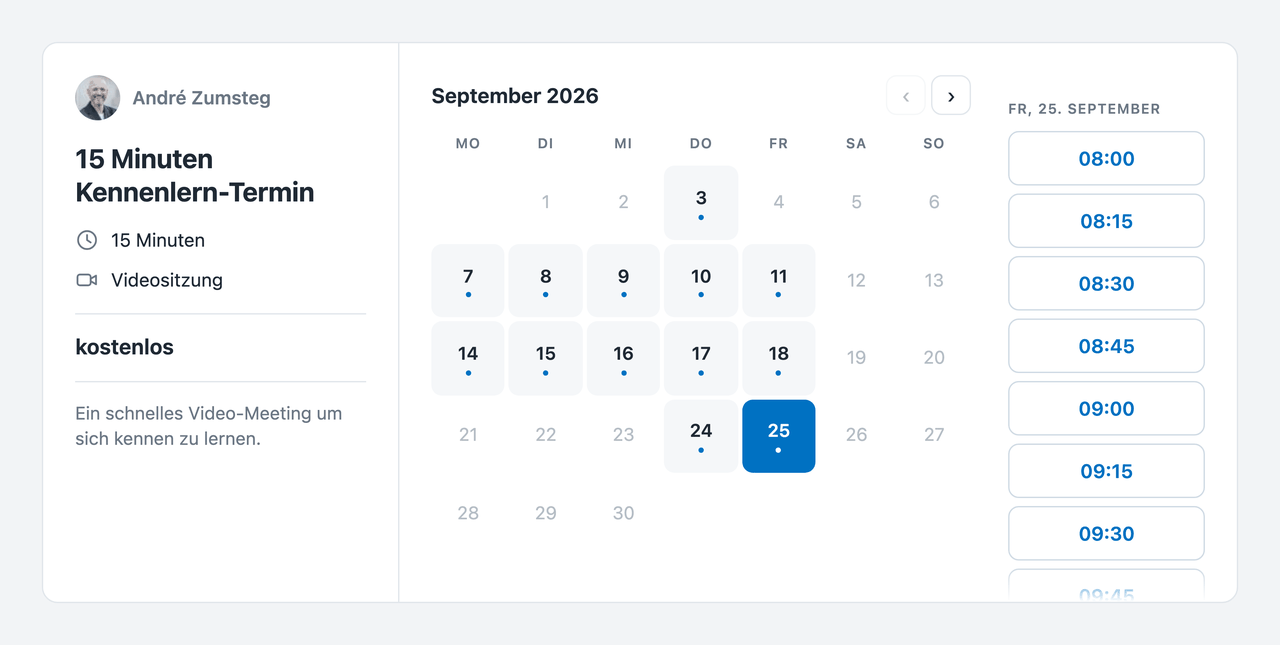
The appointment finder lets your customers pick a free slot themselves instead of writing back and forth. You define which appointment types exist and when bookings are possible; each staff member decides for themselves whether they take such appointments and which calendar they land in.
Only genuinely free times are offered. A private appointment in a calendar blocks just as much as a customer appointment, and a customer never learns why a slot is missing.
Three places, three questions
The settings deliberately sit in three places, because they answer three different questions and belong to three different people:
| Place | Question | Who decides |
|---|---|---|
Manage → Appointment finder | What is offered | an administrator |
Settings → Office hours | When bookings are possible | an administrator |
Your Profile → Appointment finder | Who takes appointments | each person, for themselves |
The third is the important one. Which appointment types exist is set by the administration — whether you personally take them and which of your calendars a booking lands in is your decision. The same principle as the calendar sharing next to it.
On the same page you also find your own booking page: a sentence about yourself, the direct link and the two lines for your website. Photo and name come from your FreeScout profile; they are not kept a second time here.
Appointment types
An appointment type describes an occasion: name, description, duration, place. Plus three settings that leave the calendar alone:
Every appointment type gets its own public address under /termin/{name}. And you decide whether a specific person is responsible or whether the customer may choose «anyone» — who actually takes the appointment is then settled at booking time against a fresh availability check.
Office hours
The default is Monday to Friday, 08:00–11:45 and 13:15–17:30. A weekday you leave empty is a closed day.
Individual people can have their own hours. Where those exist, they replace the general hours for that weekday entirely — they do not add to them. That is the rule people otherwise get wrong.
What blocks a slot
Everything below is subtracted from the office hours before a single time is offered:
| Source | Effect |
|---|---|
| An appointment in any of the person's calendars | that time is busy |
| Travel time on an appointment | the time before it is busy too |
| A recurring series | every occurrence in the window |
| All-day entries | the whole day |
| Another booking through this module | that time |
| Gap before and after on the appointment type | counts as busy |
| Public holiday from the HR module | the whole day |
| Holiday request, approved or pending | the whole range |
| Absence, approved or pending | the whole range |
That a pending request counts like an approved one is a decision, not a deduction: a customer appointment falling into a holiday approved a day later is harder to clean up than a slot that went unoffered while a request was open. A rejected request blocks nothing.
The customer learns none of this. A missing day is simply missing — whether a public holiday, a full calendar or somebody's absence is behind it is nobody's business from outside. An absence is a fact about a person, not about an offer.
Embedding it in your own website
Two lines, wherever the appointment finder should appear:
- An empty element as the place, for example
<div id="terminfinder"></div> - Plus the script
widget.jsfrom your installation, withdata-typefor the appointment type anddata-targetfor the place
Leave out data-type and the visitor chooses from all public appointment types. Leave out data-target and the finder renders exactly where the script tag stands — then it is one line. The exact two lines for your installation are ready under Your Profile → Appointment finder.
It is not an iframe. The finder grows with its content, brings no second scrollbar and takes your site's colour through the CSS variable --latf-accent. Conversely nothing from your page can reach into it: font, size and spacing are all stated explicitly, because the finder cannot know where it lands.
Prices
An appointment type is either free of charge or points at a Bexio article. It carries no price of its own — that would be a second place for the same number, and the day someone edits the article the finder would go on promising the old price.
Free of charge has to be stated explicitly and is not deduced from no article being set. «No article configured» and «free of charge» are different statements: one is a gap in the setup, the other a decision.
If the article carries a tax rate, the gross price is shown and labelled as such. If it does not, the price is shown as it stands on the article — with no claim about whether tax is included. Anything else would be guesswork, and one does not guess at prices.
What a booking creates
In order, and each step guarded on its own:
- The record in the database. First, because this is where the guard against double bookings sits: if two people click the same slot in the same instant, one gets the appointment and the other gets a message.
- The calendar entry, in the calendar the staff member chose. Only after the record, because a calendar entry without a record would be an appointment nobody can cancel.
- The kMeet room, if the type is a video meeting — under that person's Infomaniak account, because that is where the appointment happens.
- A ticket, so the booking turns up in the normal workflow and not only in a calendar nobody watches.
- The confirmation email, with the link, the price and a cancellation address that works without an account.
The last three steps never take the appointment down with them. A booking that failed because Infomaniak was unreachable would be the worse side of the mistake. If the room fails, the confirmation says so explicitly — otherwise someone waits at the agreed time for an address that never arrived.
Worth knowing
The Calendar module is required
Availability, the target calendar and the kMeet connection all come from there. Without the Calendar module the appointment finder cannot work.
HR, Bexio and the customer portal are optional
Without the HR module there are no public holidays, holidays and absences — then they simply block nothing, and nothing else changes. Without Bexio there are no chargeable appointment types. With the customer portal module the same appointment types are also offered to signed-in customers, from the same availability calculation and with their identity already known.
A cancellation cleans up in the right order
When cancelling, the Infomaniak entry is removed first and the appointment deleted after. The other way round the entry's identifier would be gone before anything could clean it up — and it would sit in that person's calendar forever.
Not getting anywhere with this? Support